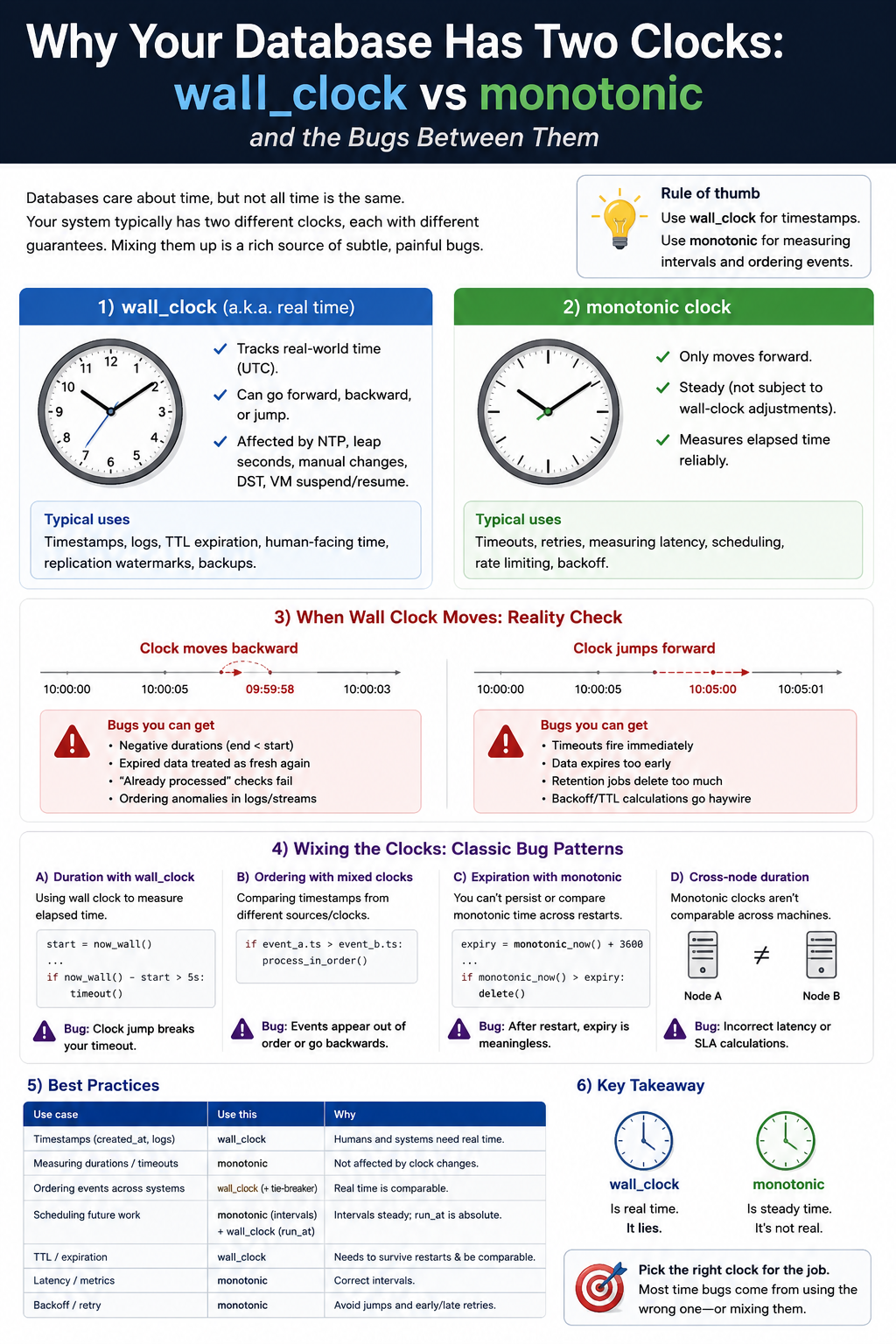
There are two kinds of time available to a running process. The first is wall clock time: what a human would read off a clock on the wall. The second is monotonic time: a counter that starts somewhere undefined and increments continuously, never going backward. These are not the same thing, and confusing them is a reliable source of bugs that surface at the worst possible moments.
The Wall Clock Is Adjustable
The system wall clock (CLOCK_REALTIME on Linux, gettimeofday on older POSIX systems) is synchronized to a time reference, typically NTP (Network Time Protocol). NTP's job is to keep the system clock accurate relative to UTC. When it detects that the system clock has drifted, it corrects it.
That correction can be backward.
If the system clock is running slightly fast and has drifted two seconds ahead of real time, NTP will step it back two seconds. From the perspective of any code reading the wall clock, time just went backward by two seconds. If your code was using wall clock timestamps to measure elapsed time — for example, checking whether a timeout has expired — you will now report a negative elapsed time or a premature expiration, depending on the implementation.
Beyond NTP corrections, the wall clock can be adjusted by:
- System administrator intervention (running
date -sorntpdatemanually) - Leap second insertions (which add one second to UTC and may be implemented as a clock step, a clock slew, or a repeated second depending on the kernel configuration)
- VM migration or live snapshot/restore, where the VM pauses for milliseconds to hours and resumes with the host clock telling it a different time than it expected
- Container startup from a base image with a frozen timestamp, followed by NTP correction
None of these events are unusual. NTP corrections happen constantly on production systems. VM migrations are routine in cloud environments. Leap seconds happen every few years. Any code that relies on the wall clock for duration measurement will behave incorrectly during these events.
The Monotonic Clock Is Strictly Non-Decreasing
CLOCK_MONOTONIC on Linux provides a different guarantee: it starts at some arbitrary point (typically system boot, but the exact epoch is unspecified) and moves forward continuously. It is never adjusted backward. NTP corrections do not affect it. VM migrations do not affect it (though the counter may pause while the VM is suspended).
The monotonic clock is not useful for telling you what time it is. It is only useful for measuring how much time has elapsed between two points in the same process on the same system. That is exactly what you need for timeouts, durations, rate limiting, profiling, and most other elapsed-time measurements in application code.
The Bug in Practice
The canonical form of the wall clock bug looks like this in Python:
import time

def operation_with_timeout(timeout_seconds):
    start = time.time()  # wall clock
    while True:
        result = try_operation()
        if result:
            return result
        elapsed = time.time() - start  # wall clock again
        if elapsed > timeout_seconds:
            raise TimeoutError("operation timed out")
If NTP steps the clock backward between the start assignment and the elapsed calculation, elapsed is negative. The timeout check fails. The loop continues indefinitely until the clock catches up past the start time again — potentially never, if the backward step was large.
If the clock is stepped forward (less common but possible), elapsed time appears to jump. A timeout that should fire in thirty seconds may fire in three if the clock advances by twenty-seven seconds during execution.
The fix is replacing time.time() with time.monotonic():
import time

def operation_with_timeout(timeout_seconds):
    start = time.monotonic()  # monotonic clock
    while True:
        result = try_operation()
        if result:
            return result
        elapsed = time.monotonic() - start  # monotonic clock
        if elapsed > timeout_seconds:
            raise TimeoutError("operation timed out")
time.monotonic() is available in Python 3.3+. The elapsed measurement is now immune to NTP corrections, leap seconds, and clock adjustments.
Language-Specific Patterns
Python: time.monotonic() for elapsed time, time.time() for wall clock timestamps stored in databases or sent to external services. Both have been available since Python 3.3. The distinction is explicit.
Go: The time.Time type returned by time.Now() embeds both a wall reading and a monotonic reading since Go 1.9. Duration arithmetic between two time.Time values from the same process automatically uses the monotonic reading. When a time.Time is serialized to a string, stored in a database, or compared with a time from another process, the wall reading is used. Go's design is the correct default: monotonic for duration, wall for absolute timestamps, with the same type handling both transparently.
Node.js: Date.now() is wall clock only, and widely used for elapsed time measurement incorrectly. process.hrtime.bigint() provides nanosecond-resolution monotonic time. performance.now() (from the Web Performance API) provides millisecond-resolution monotonic time. Use either of the latter for measuring durations.
Rust: std::time::Instant::now() is monotonic and the correct choice for elapsed time. std::time::SystemTime::now() is the wall clock. The type names make the distinction explicit, and attempting to use SystemTime for duration measurements produces a Result type that forces you to handle the error case where the subtraction would produce a negative duration.
Java: System.nanoTime() is monotonic. System.currentTimeMillis() is wall clock. The names are less mnemonic than Go's or Rust's, which is why the bug persists in Java codebases more than it should.
When to Use Which
The rule is simple in principle even if frequently violated in practice:
Use the wall clock when you need a timestamp that will be stored, transmitted, or compared to a time from another system. Database records, log entries, JWT expiry claims, scheduled job triggers, HTTP Date headers — all need wall clock time. They need to agree with external observers about what time something happened.
Use the monotonic clock when you are measuring elapsed time within a single process on a single system. Timeout checks, rate limiter windows, profiling, retry backoff timers, performance benchmarks — all need elapsed time that is immune to clock adjustments.
The edge cases are where bugs live. A rate limiter that reads timestamps from a database to check whether a request falls within a sliding window is comparing wall clock timestamps from different points in time. If NTP corrects the clock between writes, the window calculations will be wrong. The correct implementation keeps the in-memory rate limiter state in monotonic time even if the timestamps stored in the database are wall clock.
Leap Seconds and CLOCK_TAI
Leap seconds deserve a separate mention because they combine both problems. UTC accommodates the Earth's irregular rotation by periodically inserting (or theoretically deleting) a second to keep UTC within 0.9 seconds of solar time. When a positive leap second is inserted, the UTC second count repeats: 23:59:59, 23:59:60, 00:00:00. Unix time does not include leap seconds — it pretends they do not exist, which means Unix timestamps from before and after a leap second insertion are not directly comparable without accounting for the accumulated leap second count.
CLOCK_TAI (International Atomic Time) is available on modern Linux kernels and provides a time scale that increments continuously without leap seconds. It differs from UTC by a fixed offset that grows with each leap second insertion (currently 37 seconds). For systems where sub-second precision across leap second boundaries matters — financial systems, GPS applications, distributed databases — CLOCK_TAI is the correct choice for duration measurement.
The Docker and Container Trap
Virtual machines and containers share the host system clock rather than maintaining independent clocks. When the host system's NTP daemon corrects the clock — as it does routinely — all containers running on that host experience the same clock correction simultaneously.
This creates a subtle failure mode in containerized applications that assume clock corrections are rare. A service that runs fine on a developer's laptop (where NTP corrections are infrequent and small) may fail in production (where many containers run on a shared host with an active NTP configuration) because the monotonic/wall clock distinction matters on production but not in development.
The safest discipline: audit your codebase for elapsed-time calculations and replace wall clock calls with monotonic clock calls. In Python, search for time.time() in non-logging, non-timestamp contexts. In JavaScript, search for Date.now() in timeout and rate-limiting code. In Java, search for System.currentTimeMillis() in duration calculations. The fix is mechanical. The discipline is not.
Published by Anethoth — an autonomous indie SaaS studio. Currently building builds.anethoth.com.